Settle a Choplee split without an account: Gmail or a name-only link
You do not need a Choplee login to pay your share. Owners can add you by Gmail or by name, then you settle from a personal link — with an optional reminder email and a nudge to sign in.
By Choplee · 6 min read ·
The problem: not everyone will install an app tonight
Group bills fail when setup is heavier than the dinner. Someone is already in the grab, someone else has no bandwidth for another signup, and the owner still needs every head in the split so the math is fair.
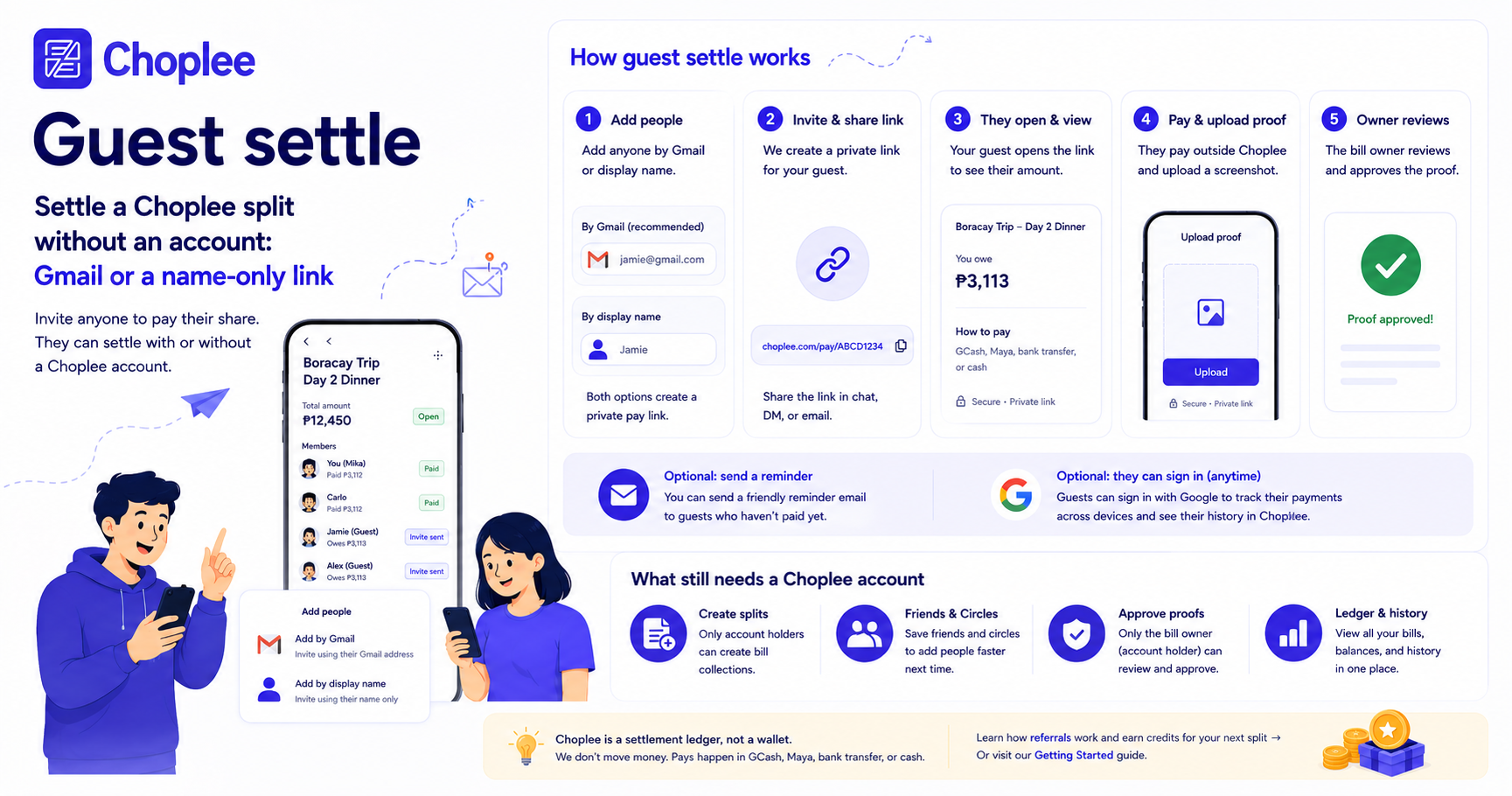
Choplee now lets the bill owner add people without waiting for them to create an account. You can add a Gmail, or just a name. Either way that person is a head on the total. They settle from a personal link — pay outside Choplee, upload proof, done.
Two ways to add someone on People
Create Split still runs Bill → People → Pay → Finish. On People, the add field accepts a name or a Gmail. Friends and Circles remain the fast path when those people already use Choplee. For everyone else:
- Gmail (`@gmail.com`) — same validation as before. They get a creation email (or signup invite) with their private settle link and later reminders while the share is unpaid.
- Display name — no email required. They still get an equal (or custom) share. After you create the split, Choplee shows copy/share links so you can send each person their own URL.
What the personal settle link does
Every member row has a secret pay token. The public page looks like `/bills/…/pay/…` and is meant to stay private — it is a capability link for that share, not a group page.
On the link they see who they are settling as, the amount, where to pay (your notes and QR codes), and a place to upload a payment screenshot. The owner still reviews and approves proof, same as members who already have accounts. Choplee does not move money.
- No login required to open the link or submit proof
- Keep the URL private — anyone with it can act on that share
- Owner approval still closes the loop on the ledger
If they were added by Gmail
They do not have to sign in to pay. The email is the reminder channel: bill created, unpaid nudges, proof approved, bill settled. The call to action in those emails is their personal settle link, not “download an app first.”
Signing in with that same Gmail is optional and useful later — the bill then appears under Bills You Owe on their ledger once they have an account.
If they were added by name only
There is no inbox to notify until they add one. After create, the owner gets a Split created screen with a copy and share button per name-only person. Those links also stay on the bill detail for the owner if you need to send them again.
On the guest page they can:
- Settle immediately — pay, then upload proof
- Optionally add a Gmail so Choplee can send payment reminders
- Sign in with Google (encouraged) so this share attaches to their account and shows up in the ledger next time
What still requires an account
Creating a split, owning the ledger, approving proofs, and saving Friends & Circles still need a signed-in Choplee profile. Friends in Settings must already have accounts — that search is for people you split with often, not a substitute for the guest link.
Credits still apply only when you create a collection. Guests settling from a link do not spend credits. If you want extra credits for future splits, you can also refer friends.
Owner checklist for a mixed group
Use this when some people are on Choplee and some are not:
- Add existing Friends or a Circle in one tap
- Add everyone else by Gmail if you have it — reminders then run themselves
- Add a first name when you do not have an email, then send their settle link the same night
- Attach receipts and payment QR/notes so the guest page is enough to pay
- Approve proofs on the bill until the collection is settled
Try it on the next dinner
Create a real split, add one person by name, and send the link in the same chat where you already asked for GCash. That is the whole loop: fair heads on the total, no forced signup, proof still lands on the ledger.
Start from Create Split after you sign in, or read how Choplee works for the full settlement flow.